MCPServe: Connect WordPress to AI Agents and Work Smarter
Your website holds the information an AI assistant needs to help you: service pages, articles, images, navigation, and the words that explain your business. Yet working with AI often begins by copying that information into a conversation, explaining where it came from, and manually transferring the result back into WordPress.
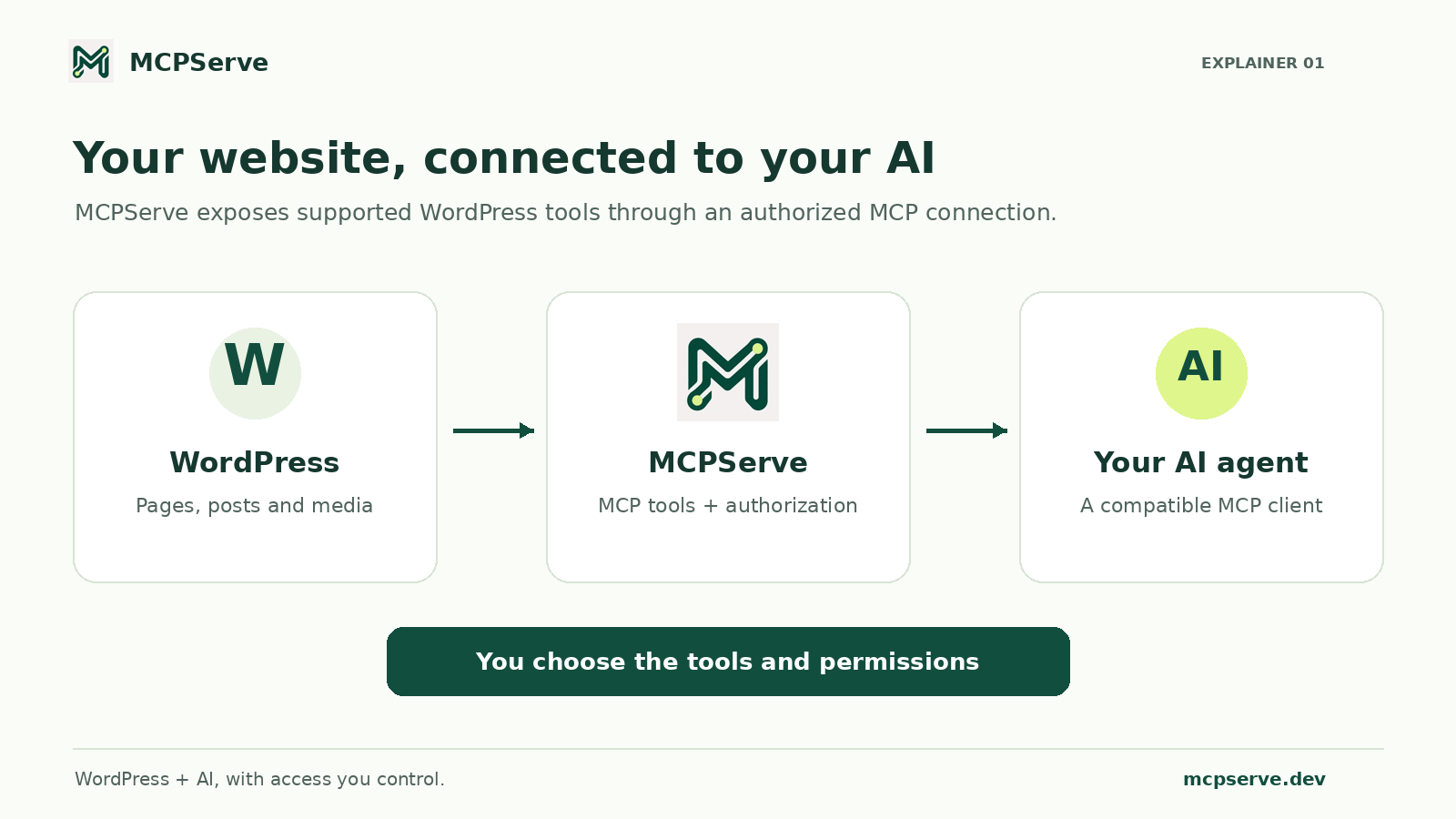
MCPServe connects WordPress to compatible AI assistants through the Model Context Protocol (MCP). It gives authorized agents tools to read your site and perform supported tasks, with access determined by your WordPress permissions and connection settings.
The result is a more direct workflow: ask your assistant to examine a page, prepare an improved draft, or review its SEO metadata using information from your actual website.
What is MCPServe?
MCPServe is a WordPress MCP connector plugin. It acts as a bridge between your WordPress installation and a compatible MCP client, such as an AI assistant with custom connector support.
MCP is an open standard for connecting AI applications to external data and tools. Instead of relying only on the text in a conversation, an assistant can request information from a connected system and use the tools that system makes available. Learn how MCP works in the official documentation.
For a website owner, MCPServe turns that connection into practical WordPress workflows. Depending on your plan and permissions, an agent can browse content, prepare drafts, inspect SEO fields, and make supported changes to your site.
Why a WordPress AI connection matters
An assistant can write a convincing paragraph without understanding your website. It may miss your existing service descriptions, repeat an article you already published, or suggest changes that do not fit your page structure.
Access to relevant site content gives it a better starting point.
For example, you might ask:
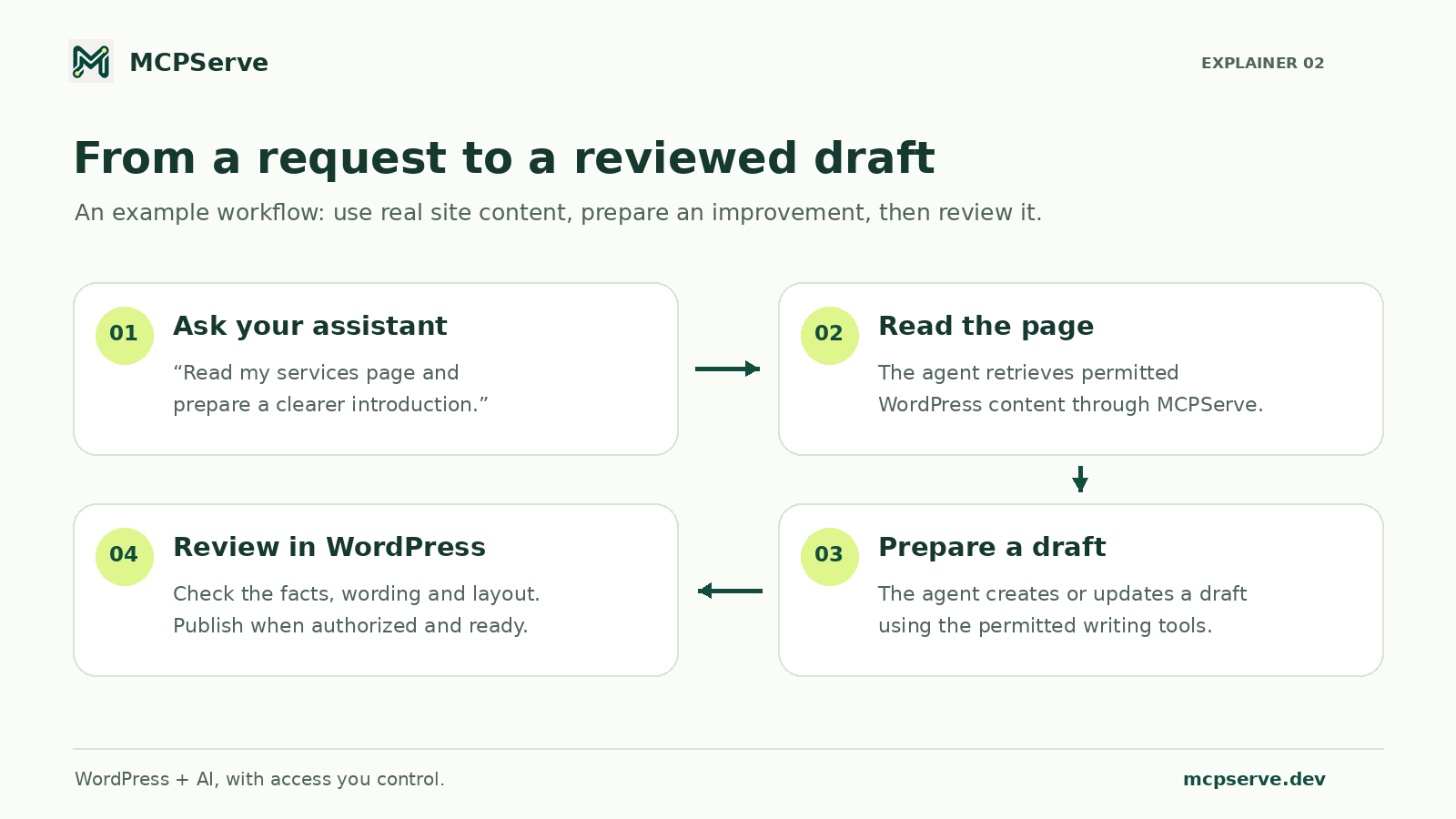
Read my services page and prepare a clearer introduction. Keep the existing services and save your proposed changes as a draft.
With an authorized MCPServe connection, the assistant can retrieve the page before preparing its response. You can then review a draft in WordPress instead of reconstructing the proposed change from a chat message.
This is especially useful when keeping content consistent across several pages or revisiting older articles that need accurate updates.
What can AI agents do with MCPServe?
Create and improve WordPress content
MCPServe provides tools for browsing posts and pages, reading existing content, and creating or editing drafts. An assistant can use those tools to help improve introductions, organize sections, or prepare a new article grounded in the information you provide and the site content it is permitted to read.
Useful requests include:
- “List my recent drafts and suggest clearer titles.”
- “Read this article and prepare a better-structured draft.”
- “Create a draft explaining these services using the details on my website.”
AI-generated wording still benefits from editorial review, particularly for prices, product claims, and technical details.
Review on-page SEO
MCPServe supports inspections of stored content and SEO fields, including titles, descriptions, headings, and image alternative text. It also offers tools for updating supported SEO metadata.
That makes it useful for a focused request such as:
Audit this page for unclear headings and missing image descriptions. Suggest an accurate SEO title and meta description based on its content.
These checks help identify content issues that deserve attention. They assess the information available to the connector; they are not a complete crawl, a search-ranking report, or a guarantee of higher positions.
Manage supported website tasks
Pro adds capabilities for publishing, editing live content, and working with supported design, navigation, media, moderation, and taxonomy tools.
An authorized assistant can help update a menu link, improve an image’s alternative text, or adjust an editable design setting. The available tools determine what it can change, and your permissions determine what it is allowed to do.
Prepare landing pages for campaigns
MCPServe also supports landing-page reviews and UTM link creation. These tools can help an assistant examine whether a page explains its offer clearly and whether its calls to action match a campaign brief.
Advertising execution remains in your advertising platform. MCPServe’s landing-page tools do not launch campaigns, spend budgets, or retrieve ad-account performance data.
AI-readable content and AI agent access: how they work together
A useful website needs clear information that people can understand and automated systems can interpret.
For public content, that means descriptive headings, direct explanations, consistent product names, and important details presented as text. An article about MCPServe should clearly answer what the plugin does, who it serves, how its connection works, and which actions require permission.
MCPServe addresses another part of that relationship: authorized access to WordPress through tools. A connected agent can request content and perform permitted operations through the connector.
Installing an MCP connector does not automatically make a website appear in AI-generated search answers. Public discovery still depends on accessible, useful content and search fundamentals. Google’s guidance confirms that its AI search features use the same foundational SEO practices, with no special AI markup required. Read Google’s guidance on AI features and websites.
MCPServe can support the editorial work behind clearer pages while giving your chosen assistant a practical way to work with them.
Keep control over your WordPress website
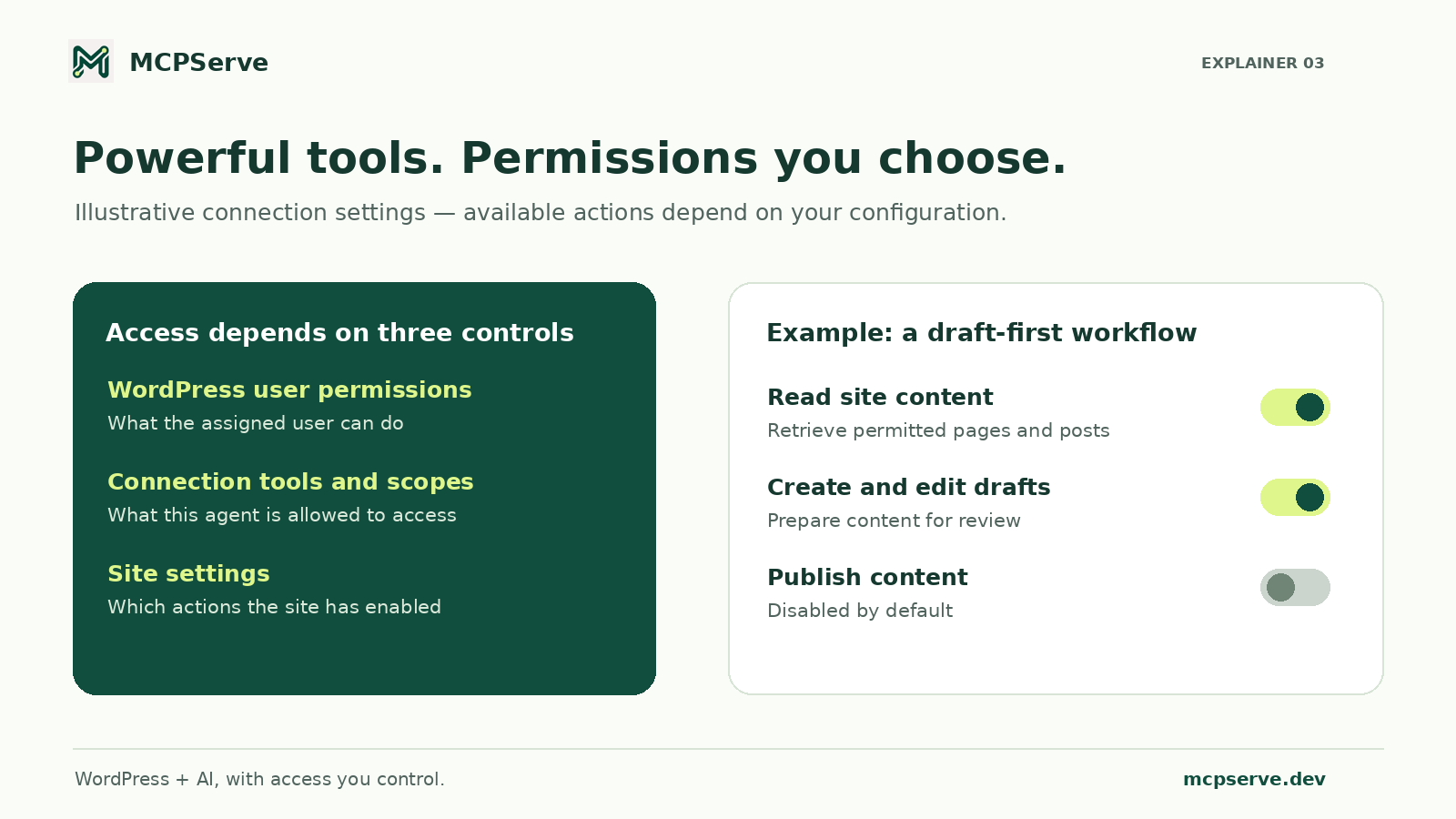
Connecting an agent is a decision about access. MCPServe lets you choose permitted tools and scopes, associate the connection with a WordPress user, and revoke access when needed.
Publishing is disabled by default. Enabling it requires the relevant site setting, publishing scope, WordPress user permission, and an explicit confirmation parameter.
You can begin with reading and draft preparation, then enable additional capabilities when they fit your workflow. That gives teams a useful starting point: let the assistant prepare work and keep editorial review in WordPress.
Who is MCPServe for?
Business owners can use it to keep service pages and articles accurate without repeatedly copying content between applications.
Agencies and freelancers can use supported tools to prepare client updates, review page content, and maintain navigation through an authorized connection.
Content and SEO teams can incorporate it into draft preparation and on-page review workflows.
Developers building AI workflows can use its exposed WordPress tools through a compatible MCP client, subject to the connector’s capabilities and permissions.
How to get started with MCPServe
- Install and activate MCPServe in WordPress.
- Enable the connector and create a server profile.
- Assign a WordPress user and choose the permitted tools and scopes.
- Add the server’s HTTPS MCP URL to a compatible client and complete OAuth authorization.
- Begin with a focused task, such as reading a page or preparing a draft.
Custom connector availability depends on your AI provider and plan. Your AI subscription and usage costs are separate from MCPServe; the plugin does not include AI credits or independently call an AI provider.
Frequently asked questions
Is MCPServe an AI writing tool?
MCPServe is a connector. Your chosen AI assistant generates the wording, while MCPServe provides permitted access to WordPress content and supported tools.
Can MCPServe help improve SEO?
It can help an authorized assistant inspect stored page content, review supported SEO fields, and update metadata. Search visibility also depends on content quality, technical accessibility, competition, and other factors outside the connector.
Does MCPServe support ChatGPT and Claude?
It is designed to connect with compatible MCP clients, including supported ChatGPT and Claude custom connector workflows. Availability depends on the client, subscription, and configuration.
Is there a free plan?
MCPServe currently offers a seven-day Pro trial. After the trial, Basic remains free for browsing content, creating and editing drafts, auditing SEO, and updating SEO metadata. Pro adds further supported management capabilities. Check the website for current plan details.
Put your website’s context to work
The most useful AI workflow begins with the information your business already has. MCPServe brings that information into your assistant’s workflow and provides a controlled route for turning a request into supported WordPress actions.
Start with one page, one clear instruction, and the permissions needed for the task. Read the content, prepare the improvement, and review the result where your website lives.